Showing posts with label only. Show all posts

Sunday, 25 October 2015

Benzo vs Chroma vs Other (Marshmallow ROM only)


Hey folks,

Which ROM do you prefer of these? If you don't like either, which do you like and why?
I'm hinging on either Chroma or Benzo, both of which are very good but I want customization and stability too.


Stutters only while streaming (probably NOT the bandwidth issue).


I use a file manager like ES File Explorer to locate a video file on a Windows Network Share and open it with MX Player. The file manager seems to convert Windows Network protocol into HTTP, and then passes the address to MX Player.

I have the following problems:
* For some files, streaming by the aforementioned configuration makes the video stutter. When the same file is copied to local storage and played it plays fine. This is irrelevant whether HW or SW decoding is used.
* For some files, HW decoding does not work at all when streaming or works but stutters and sometimes stops. When the same file is copied to local storage and played, HW decoding works fine.

First of all, I think it is not a bandwidth problem. It is a 300Mbps home Wi-Fi network, and the actual PC to Android copy speed is over 7MB/s (megabytes ) in ES File Explorer.
Secondly, to be fair, it does not seem only the problem of MX Player. For those problematic files, I tried VLC, Gom Player, Good Player, etc and they all had the same symptom.
Thirdly, it does not seem to be a problem of specific device, manufacturer, or low-end CPU. This happens on all my android devices, some of which are quite high-end devices.
Fourthly, it does not seem a problem of a specific streaming software (this case, ES File Explorer), because it happened with other file manager applications or direct HTTP/FTP streaming from a computer in my home network.
Finally, it does not seem to be the problem of video resolution either. Some 1080p/720p video files do not have this problem, but some 1080p/720p files do. For example, one video file that stutters when streaming is just a small 720p video whose video bandwidth is only about 2Mbps and audio bnadwidth is about 160Kbps. This is far below my 7MB/s copy speed.

This problem has been bugging me for more than a few years and I still cannot get a solution. It could be Android's problem because, even a low-end Windows laptop and an old Macbook can play those problematic files just fine. But those are not tablets, and I want to play them on tablets.

Do anyone of you have the same problem? Is there any solution to this other than transcoding or re-encoding the files?


Saturday, 24 October 2015

Tmobile springboard reset when device only works plugged in.


My springboard tablet stopped working without being plugged in almost as soon as I got it from T-Mobile. It fell from a height of about one foot onto a carpeted surface and stopped working. I finally opened it up and found out that the bracket that clipped and attached the the battery to the circuit board had cracked and broken away from the board. And I couldn't figure out how to solder such fine solders with my limited equipment and experience. My dilemma is that since it only works when plugged in, it automatically turns on when plugged in and I can't do the hard reset by holding the power button down and the volume down button until it vibrates and then pushing the volume up button. Does anybody have any suggestions on how to return the device to stock condition. How can I work around this hardware fault.


marshmallow 6.0 and USB Fat32 ONLY ! no exfat or NTFS support


Hello.
I use my nexus player as Kodi player
I have upgraded to android 6.0.
When y connect a USB memory stick formated in NTFS or ExFAT, android didnt mount the file system, I can only format the USB stick.
With Fat32 usb memory stick, Android mount the file system and I can access the files (/STORAGE/XXXXX).

But with the fat32 system, i can't copy file > 4 Go (big MKV video) on the memory stick (fat32 limitation).

Can you help me ?
Thanks, and sorry for my bad english.


Android 6.0 Marshmallow update KDZ only H815


Android 6.0 Marshmallow update KDZ only H815


Download :


csmgdl.lgmobile.com/dn/downloader.dev?fileKey=FW1F33M2328CAJLC9D894FS/H81520A_00.kdz


Friday, 23 October 2015

Newbie Question - Does Rapid/Quick Charge technology only work when the phone is on?


On all my previous phones, I used to turn the phone completely off when charging.

Did the same for my first 5x charge up, but noticed after 20 minutes in phone-off-charging-state when I checked the white battery icon, it wasn't showing it was filled up at all. Strange.

So I turn the phone on, it shows it's charging, but only got to 5% from a completely drained battery.

This didn't seem right, so I left the phone on for 20 more minutes where it specifically stated "rapid charging". It shot from 5% -> 31%. Let it keep doing it's thing and 20 minutes later it went from 31% -> 75% with an estimated 23 minutes left. Impressive if it really would go from 5% -> 100% in about an hour.

So, does rapid charging only initiate with the phone on? Or, is that first 5% just a natural long charge area of the battery and the phone woulda hit high-gear-rapid-charging if I left it off the whole time?


[APP][Samsung Only] Samsung Rewards - Earn Points and Exchange Them for cool Products


Hello Guys

I present to you Samsung Rewards an app by Samsung whereby you can earn points to then exchange for cool products like the Gear VR, Gear Circle, Level Over etc.

How to Earn Points

There are several ways, you gain points from opening the app daily and sometimes, if you are lucky, by just browsing through the app you can get, what they call "Mystery Points". You can also earn points by downloading the apps they put there, you can earn by completing surveys, you can earn when the friends you are linked to earn points.

Other cool things is they run giveaways monthly, like now they are giving away the S6 Blue Topaz

You can get the app on Google Play Store, but would be very happy if you used this link to Link to me on Samsung Rewards and earn a starting bonus. http://s-rewards.co.za/linkme.html?id=B4D66153* if you use that link it means I'll be linked to you and you will earn points when I earn also.

My Rewards ID:B4D66153 Please Link to Me

Thank you and Enjoy!


[HELP] Bricked my phone while trying to root, can't load recovery only download mode


Hello there, I am very very new, so please forgive if I do a mistake.
So earlier today I was trying to root my S5(SM-G900H) and I was trying out this method: http://www.androidrootz.com/2014/04/...very-root.html
Everything was going smooth, Odin showed me the "PASS!" too, but when I pressed the volume up, home and power button keys together, nothing happened and the phone was on the download mode, it didn't do anything. So I took out the battery and rebooted, and it rebooted normally and I was able to use it again. I tried the same method at least 10 times more but always failed. Then after some time I stumbled upon this: http://forum.xda-developers.com/show....php?t=2696537
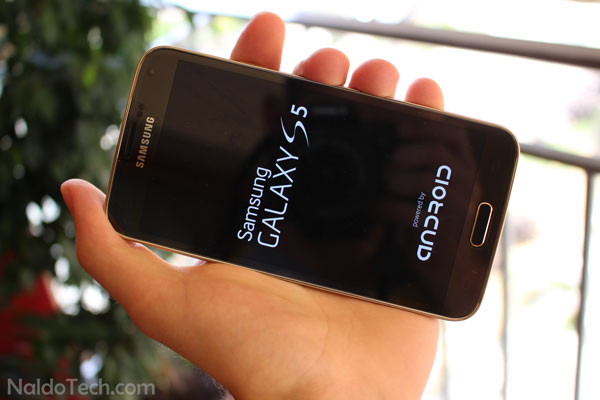
Followed all steps except one, didn't uncheck the "Auto Reboot" box and the "F. Reset Time" simply because Odin didn't let me, the boxes were dim and the mouse didn't respond on hovering over them. So, now my mistake, I pressed start anyway and Odin got to the blue box saying "RESET" or something and my phone restarted and the "Samsung Galaxy S5" logo and the "Powered by android" logo screen came up and it has been stuck there forever. I tried getting it into recovery a lot of times but recovery just won't come however it does load the download mode, so I tried the same "[SM-G900*] CF-Auto-Root" method, only this time I used a version of Odin that let me uncheck all the boxes, I tried several times but it just got stuck on the download mode like it happened in the first method, I rebooted and still stuck on the black and white samsung screen, yes that's right, not even the boot up animation. PLEASE HELP PLEASE HELP. I'M DYING


Here is a picture of what my problem looks like:


[KERNEL][MM][CONCEPT ROM][ADVANCED STOCK WITH RECOVERY](UB Only)


Get it here
Just Fastboot it.
Many thanks to @Gustavo RD78 for his debugging assistance. (He will release a more advanced version later when his device comes back from repairs)
To root, download Chainfires latest flashable zip from Here
Then reboot and press press volume up when LED turns on to enter TWRP recovery, and flash the zip from the stored location.
Note: In TWRP "mount " menu, make sure system read only box in bottom left corner is not ticked.
Note:2 This kernel is set to permissive by default.

This is a Pure stock kernel (zImage) for unlocked bootloaders with ramdisk modifications only.

Flash, and enjoy:good:


WIFI working smoothly only on StockROM


Hi,
I have a T210R Galaxy Tab 3, which I flashed with different roms to try them. Unfortunately, I have observed that wifi on it remains connected and stable only on StockROM I used, whereas no other roms (stock ones included) have wifi stable. Wifi keeps catching and losing signals after few seconds/minutes. Any idea why is this happening? If there's a wifi tweak for this let me know. I'd be grateful.

Regards


Thursday, 22 October 2015

Htc 820 rebooting ONLY into recovery and black screen


Hello i tried to flash twrp recovery on my htc 820u but i think it didn't install. Phone was still working correctly until i tried to do a factory reset. Now it will just boot into recovery every time and i have only a black screen. the phone vibrates when i touch the screen but i cannot switch it off. when i reboot it just goes back to recovery.

Can anyone suggest something please? Is there a way to prevent the phone from booting into recovery?

PS: I'm on lollipop 5.0


LGE AndroidNet Driver detected only - Download Mode not Detected - Bricked D801


So I bought this secondhand G2 and it said on the cover it's D802T (Australia Model) while inside it was D802 (International). For sake of generosity I tried to flash it with D802T .kdz file and got it bricked, when I opened the back cover it was D801 model (Freaky right?).

So basically I'm stuck with:

1. LG BootLoop with constant waving Blue and Green LED
2. Download Mode - Turns on but doesn't get detected by Computer (using Windows 10 and trust me Windows 7/8 didn't detect it either)
3. Vol Down + Power takes me to Factory Reset cuz no recovery installed
4 LG BootLoop detected as (LGE AndroidNet) driver on device manager

I've tried the following methods for it's recovery:

1. Tried another .kdz but failed since download mode doesn't detect
2. Tried .tot method in LGE AndroidNet mode (COM41) using "BIN_LGD802AT-00-V10b-SEA-XX-SEP-04-2013-32G+0.tot" stock but it gives some Failed to Read model error
3. Tried LG Support Tool (B2CAppSetup) to download online stock but it asks for Serial No. and I don't have the IMEI because the back casing seems to be replaced by some other phone

The repair center puts up the lame excuse that the charging port is faulty thats why Download Mode is not being detected but that cannot be mode lame cuz that port was the reason it got into Download Mode Duh.

I'm a student and in my place buying phone is basically as expensive as buying a car and even though it's secondhand, it got bricked not 24 hours after I bought it and the shopkeeper won't take it back cuz he says it's my fault I wanted to be generous and try original roms, so I'm sitting in shivers and trembles here.

Any help would be greatly appreciated.

Note: If this threat has been discussed already please send me the link to it cuz I couldn't find any. And please try not to feed me anger by asking if I re-installed drivers or did I try another computer or did I try adb or fastboot method cuz if you're experienced enough, you'd already know those considerations would've been taken and been failed to help so far. Thank you and please help.


Sony XPERIA Z5 Compact has only 21 GB free internal storage - why Sony lies?


Sony XPERIA Z5 Compact have 32 GB internal storage, but when you start the phone and doesnt install anything, there is only 22 GB free memory. If you update preinstalled application, there is only 21 GB. I understand, that Android take some place. But i really don't understand, how can Sony Mobile said on official website, that:

"**Memory comprises approximately 5 GB of firmware, plus 27 GB of “Internal storage” for music, pictures and films, and downloaded applications and their data."

source - http://www.sonymobile.com/global-en/...pecifications/

I like many Sony XPERIA smartphones, record about 2500 videos about that and work hard to support Sony Mobile company. But this is not good information... If there will be information about 10 GB firmware on Sony website, no more problem. But for now there is 5 GB space which i miss in my XPERIA Z5 Compact (and Z5 too).


Lg g2 stuck on qualcomm mode only


Hey guys,i have Lg g2 800 at&t i installed a custom LP in it,after few hours it,s touch stopped working then flash it with KK firmware but no luck then i apply hardbrick proccess on it after flashing images i flash it KK firmware then it,s touch was working auto like a ghost using it then i thought to write other firmware images on it so i did agian same proccess i was trying it to connect in qualcomm mode with pc but now when i insert cable in pc auto detect the phone in qualcomm mode 9008 i short resistence many time with cable or without cable bt whenever i connect it with pc phone auto connect in qualcomm mode,so i put the phone for 2 weeks beside today when i connect it pc it,s still same it,s same with battery or without battery and not powering on also,sorry for my bad english.it,s make me crazy dont know what to do now.Experts please :confused::confused::confused::confused:


[MOD] Quickboot for Moto E (Only for CM based ROMS)


It is not developed by me. I found from a forum and tested it in my Moto E which running AICP 10.0.
You guys can check it out.
Here is the link to the forum:

http://forum.xda-developers.com/andr...-0-12-t3082041

You can also download quick boot from here:-

http://forum.xda-developers.com/atta...7&d=1429011600

All you have to do is:-
1. Download QuickBoot.zip from XDA attachments section
2. Flash the downloaded zip file from the recovery
3. Enable QuickBoot from Developers


Apps open with (once only and always) option where?


Hello,

on my Galaxy S6 i have the option, when i open a pdf (for example) it ask once only or always. But on my Note 5 i dont the option. Does anybody a idea, how i get the option on note 5?

Look at the attachemend

Note 5
S6


Wednesday, 21 October 2015

Phone will not charge/detect usb when booted in Android, only when OS is not booted


Hello,

I had an HTC rooted and after installing busy box it couldn't anymore charge/detect when usb to computer was connected.
If the OS was not powered it would work to charge or give commands to the smartphone via ADB/fastboot.

I have factory reset and relocked the smartphone with fatsboot flash ruu.zip

The problem is that the problem still persists when the phone is booted in Android (no charge or detect usb).

I have currently tried the following actions with no success:
1) boot into safe mode, reboot
2) disable daydream, fastboot
3) charge for 10 min while phone is off, disconnect charger and continuously hold power+volume up+volume down for 2 minutes

Does anyone have an idea what could be the issue ?


Edge / GSM only, no 3G/LTE possible anymore


Hey,
since a few days, I'm not able to access 3G/LTE anymore in Germany with European G4 H815. Bootloader is unlocked (so no warranty for me).
I already reflashed it with KDZ with CSE flash, also tried to enable/reflash LTE Bands described here:
http://forum.xda-developers.com/g4/g...bands-t3137818

2G/GSM/Edge is possible, not more. Forcing the network to use 3G only results in no connection to the network.
Tried also swapping SIM cards with my GFs smartphone, her SIM card can also only get GSM in my G4, my SIM card can easily get H+ on her smartphone.

May this be a defective modem, or maybe a software bug? I flashed Genisys Rom, now back to stock.

Help would be greatly appreciated! :) Any thoughts?
Kind regards


set Android 6.0 default USB config to MTP rather than “charging only”?


Whenever my device (Nexus 5, Android 6.0) connects via USB, the USB config always defaults to "charging only".
This is a big problem since whenever I'd like to listen mp3 connecting nexus 5 to my car stereo I have to manually set the mode to MTP.
The big annoyance is that whenever I turn off the car engine and then restart it the nexus 5 USB connection go back to "charging only" !!!
I already tried debugging mode:
Develop settings -> USB Configuration is set to MTP.

Any chance to set USB default as MTP?

Thanks


Flash TWRP using Flashify App - No PC Needed (Dev ROM only)


For those who are having a hard time flashing TWRP using a PC, I just wanna share it to you guys! I have tested this myself on my Mi-4c
Requirements:
Mi-4c device
Full Developer ROM pack for our phone ( make sure you install GApps too)
TWRP image (TWRP 2.8.7.1 with English and Chinese V2)
Flashify App
**And of cousre, courage and common sense

Disclaimer: Don't blame me if you brick your device, do it at your own risk.

1. Download a developer ROM from the official download page: Click Here or use this Developer ROM

2. Flash the Developer ROM from the updater app and install GApps of course. Now, you should have root access on your phone.

3. Download the flashable TWRP zip from the original thread or below - Original TWRP Thread --- Thanks to @油炸包子-


TWRP Link 1


TWRP Link 2


TWRP Link 3


4. Open the TWRP zip file you downloaded using an Archiver app or ES Explorer and you will find a recovery.img inside.
4.1 Extract the recovery.img to the root of your SDCard (you can rename it to anything you like just make sure the extension stays as .img)


5. Install Flashify from Playstore.
5.1 Launch the app, accept disclaimer then you will get a message that it needs root access.


5.2 Launch the Security app and provide root permission to Flashify.


6. After providing root permission to flashify, launch the app again and select Recovery image from the Flash tab, choose the extracted ".img" file that you have extracted to your SDCard then flash.


7. There should be a success "Flash complete" message then select "Reboot now" to reboot your phone.


Congratulations!! You should now have TWRP after reboot.

*****Access TWRP by powering the phone off, turn it back on by holding the power together with the volume up (+) button and it should take you to the TWRP screen if a few sec.*****

Disclaimer: Don't blame me if you brick your device, do it at your own risk.

My original thread: http://<b><font color="DarkOrange">h...tml</font></b>